The short answer
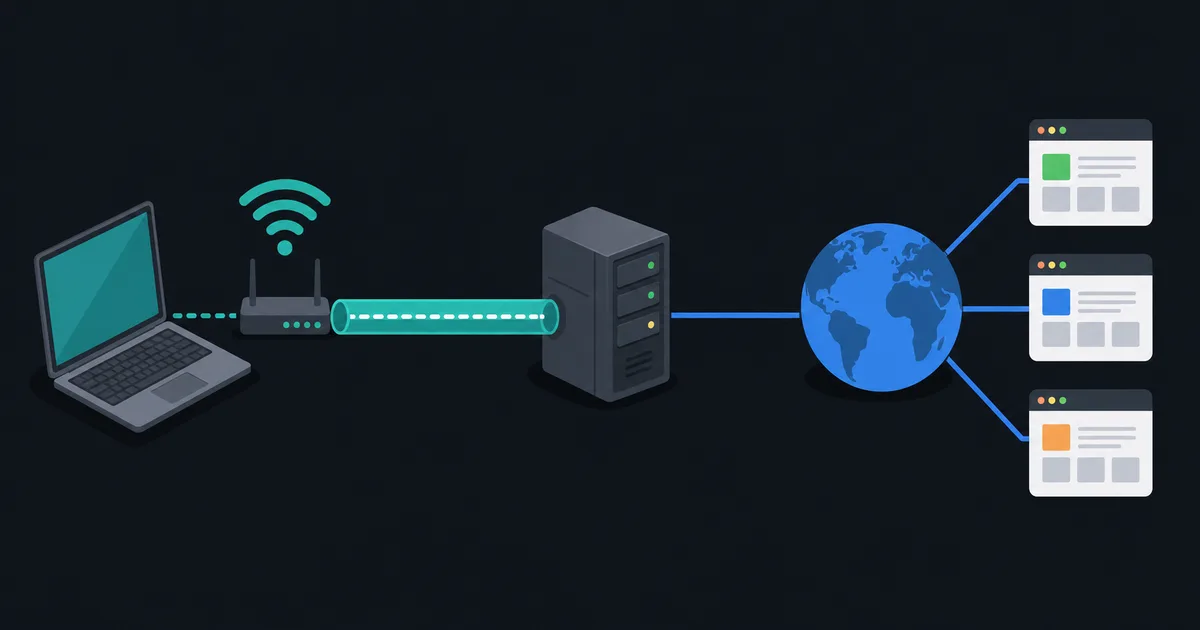
A proxy server is an intermediary: your application sends a request to the proxy, and the proxy makes or forwards the onward connection. The destination often sees the proxy's IP address instead of your network's public IP address. Proxies can enforce workplace policy, cache content, provide controlled access, or let a specific application use a different network path.
That description has important limits. A proxy does not automatically encrypt traffic, protect every app on a device, or make a person anonymous. Its effect depends on the proxy type, how the application is configured, and whether the final connection uses its own encryption such as HTTPS.
How a forward proxy works
A forward proxy acts for the client. Instead of connecting directly to a website, a browser or another application connects to a proxy selected by its settings. The proxy then contacts the requested service and returns the response.
For ordinary HTTP, a proxy can receive the request and make its own HTTP request to the origin server. For an HTTPS website, a standard HTTP proxy commonly uses the CONNECT method to establish a tunnel to the requested host. Once the tunnel is set up, the browser performs TLS with the website through that tunnel. A proxy that merely relays a CONNECT tunnel normally cannot read the encrypted page contents, but it can still know the destination host, timing, connection size, and its own account or client information.
An organization can deliberately configure inspection using a trusted local certificate. That is a different model: the proxy terminates and re-establishes TLS, so it can inspect content. It must be explicit, carefully administered, and treated as a powerful trust boundary.
HTTP, HTTPS, and SOCKS proxies
Different proxy protocols work at different layers:
- HTTP proxies understand HTTP request semantics and are common in browsers and managed networks.
- HTTPS proxy can describe an HTTP proxy reached through TLS, or simply a proxy used for HTTPS destinations. The wording is ambiguous, so check the product documentation.
- SOCKS proxies relay connections more generally. SOCKS5 can support TCP connections and optional UDP relaying, but the application must support it and choose to use it.
Neither HTTP nor SOCKS makes the traffic between the proxy and the destination confidential by itself. HTTPS protects web content between the browser and website when certificate validation succeeds. Other applications need an appropriate secure protocol of their own.
A proxy only covers configured traffic
This is the most practical difference between a proxy and a system-wide VPN. A browser can use a proxy while other browsers, apps, DNS resolvers, games, and operating-system services continue to use the normal network path. Some applications ignore system proxy settings; others support only HTTP proxies and not SOCKS.
That selective behavior is valuable when you need a particular tool to reach an internal service or when an organization wants web traffic to pass through a security gateway. It also means a proxy is a poor choice when the goal is to route all device traffic through one protected path. VPN vs Proxy compares those scopes directly.
Transparent proxies and reverse proxies are different roles
A transparent or interception proxy redirects traffic without the client choosing it in application settings. Captive portals and enterprise networks sometimes use this approach. It can be difficult to detect and can break assumptions, especially when HTTPS prevents an intermediary from changing content without certificate errors.
A reverse proxy is on the server side. It accepts requests for a website or API and forwards them to backend servers. Reverse proxies are widely used for load balancing, caching, TLS termination, and protecting application servers. They are not a privacy proxy that an end user normally configures in a browser.
The same machine can technically perform more than one intermediary role, but the trust and security questions are different. The HTTP standard distinguishes proxies, gateways (often called reverse proxies), and tunnels for this reason.
What a proxy can and cannot hide
The destination service usually sees the proxy's public IP address. That may reduce direct exposure of your home or office address to that service. However, a website can still recognize a signed-in account, browser fingerprint, cookies, request headers, or information you submit.
The proxy operator may be able to see a great deal. For unencrypted protocols it can often read and modify traffic. For HTTPS tunnels it still observes metadata and may be able to associate activity with your proxy account. A free or unknown proxy deserves particular caution: routing traffic through it transfers trust rather than removing the need for trust.
Proxies are also not firewalls. A firewall makes allow-or-deny decisions based on policy. A proxy is an intermediary, although a managed proxy can enforce security policy as one of its functions.
When a proxy makes sense
Use a proxy when an application needs a specific intermediary, a business requires web filtering or logging, a developer needs controlled test traffic, or a service provides a documented proxy endpoint. Use a VPN when you need selected or system-wide routes placed in an encrypted tunnel to a VPN server and the client supports the intended DNS and IP routing.
Before enabling a proxy, confirm which apps use it, whether the proxy requires authentication, how it handles DNS, and what its operator logs. Do not bypass an employer, school, or network operator's rules without authorization.
Authentication, caching, and failure modes
Many managed proxies require a username, password, client certificate, or integrated workplace identity. Store credentials only in the supported application or operating-system mechanism, and do not place them in scripts, screenshots, or shared browser profiles. A proxy can return its own authentication challenge or access-denied page, so a connection failure may be policy, credentials, certificate trust, or the destination itself.
Some HTTP proxies cache eligible responses. Caching can reduce repeated downloads and improve performance, but modern HTTPS content, personalized pages, and cache-control headers deliberately limit what a shared proxy can reuse. A cache is not a guarantee that a page is current, and a proxy should respect the origin server's HTTP semantics.
When troubleshooting, test whether the application reaches the proxy, whether the proxy can resolve and reach the destination, and whether TLS validation succeeds. Do not disable certificate checks to make a proxied connection work. A certificate warning can indicate a misconfiguration or a serious interception risk.
Proxy settings also need change control. Removing a proxy may restore direct access but can violate a managed-network policy; adding one can send sensitive traffic to an unintended operator. Record the proxy hostname, port, protocol, and ownership, and remove temporary test configuration when the test is complete.
The takeaway
A proxy server forwards traffic for a configured application. It can change the apparent source IP and support useful network policy, but it does not automatically encrypt traffic, cover every app, or provide anonymity. The key questions are which traffic reaches the proxy, whether the final connection is encrypted, and who operates the intermediary.