The short answer
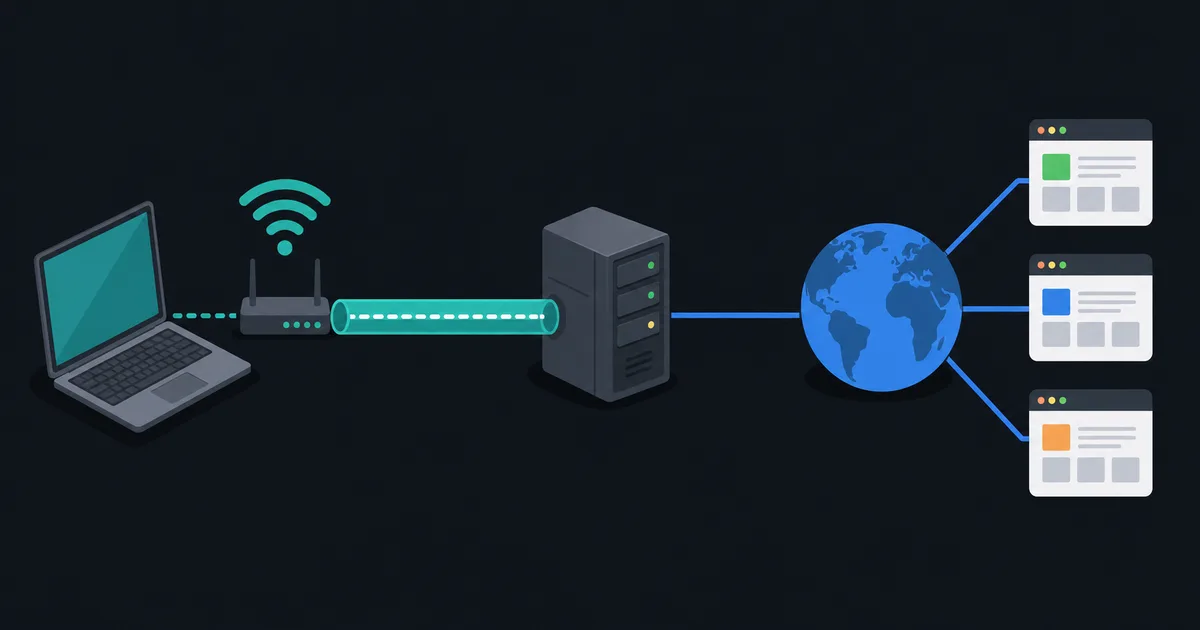
A VPN and a proxy both place an intermediary between an application and a destination, so both can make a destination see a different public IP address. The similarity ends there. A VPN client usually creates an encrypted tunnel and can route much or all selected device traffic through it. A proxy normally handles only traffic from applications that are configured to use that proxy.
Neither tool is a guarantee of anonymity, and neither replaces HTTPS, safe software, or secure accounts. The right choice depends on how much traffic needs to use the alternate path, what must be encrypted, and which operator you are willing to trust.
VPN and proxy compared
| Question | VPN | Proxy |
|---|---|---|
| Typical coverage | Selected routes or device traffic | Configured applications or connections |
| Device-to-intermediary encryption | Yes, as part of the VPN protocol | Only if the proxy connection/protocol provides it |
| DNS handling | Client can route DNS through the tunnel | Varies by application and proxy type |
| Destination IP | Usually sees VPN server IP | Usually sees proxy IP for proxied traffic |
| Common use | Privacy on untrusted networks, remote network access | Web policy, testing, app-specific routing |
| Main trust point | VPN provider or organization | Proxy operator or organization |
The table describes common behavior, not a promise about every product. Split tunneling can leave some VPN traffic outside the tunnel. A browser proxy can cover just one browser profile. Read the configuration, rather than assuming the word "VPN" or "proxy" explains every route.
Encryption is not the same as privacy
A VPN encrypts traffic between your device and the VPN server. This protects that part of the path from local network observers, but the VPN server then forwards traffic to its destination. The VPN provider is therefore a meaningful trust boundary.
A proxy can be reached over an encrypted connection, and an HTTP proxy can create a tunnel for an HTTPS site. But a generic proxy is not automatically an encrypted tunnel for all traffic. HTTPS remains important with either tool: it protects web content between the browser and the website, including after traffic leaves the VPN or proxy server.
This layered view avoids two common mistakes. A VPN does not make an unsafe HTTP service safe end to end, and an HTTPS padlock does not mean a local network cannot see all connection metadata. What Is a Proxy Server? explains the proxy side in more detail.
Traffic scope and application compatibility
VPN software usually installs a virtual network interface and routing rules. Depending on the chosen mode, it can route internet traffic, a private-office subnet, or a subset of destinations through the tunnel. Well-designed clients also account for DNS and both IPv4 and IPv6, but these details should be checked.
Proxies work at the application level. Browsers often support HTTP proxy settings. Developer tools and some command-line programs support HTTP or SOCKS proxies. Many games, operating-system services, and device applications do not. That can be exactly what you want when only one task should use the intermediary, but it can create accidental gaps when a person expects full-device coverage.
IP address visibility and tracking
For traffic that actually uses the service, the final destination normally sees the intermediary's public IP instead of the public IP assigned by your internet provider. It does not erase other identifiers. A signed-in account, cookie, browser fingerprint, payment record, or information you submit can still identify or link activity.
The local network and internet provider can generally see a connection to the VPN server or proxy. They may learn different metadata depending on protocol, routing, and encryption. The intermediary operator can also observe connection metadata, and it may see content when the destination protocol lacks its own encryption. Choose services with clear policies and realistic claims.
Performance and reliability
Both tools add an extra hop, and both can add latency or reduce throughput if the server is distant, busy, or poorly connected. A VPN adds encryption and encapsulation overhead; a proxy may be lighter for one web request but still depends on the same route quality. Neither is inherently faster.
Use measured results for your destination rather than general claims. Compare latency under load, not just an idle speed test, and remember that packet loss, Wi-Fi, and server performance can matter more than the intermediary. A proxy is also not a reliable workaround for a service that blocks access by account or other application-level controls.
Which should you use?
Choose a VPN when you need a secure tunnel for selected network traffic, are using an untrusted local network, or need remote access to a private network. Choose a proxy when a single application needs a documented intermediary, such as a managed web gateway or a development test environment.
For a personal privacy service, prioritize clear routing, DNS and IPv6 behavior, secure protocols, software updates, and transparent provider practices. For a business proxy, prioritize authorization, certificate handling, logging policy, and the exact applications it supports. Do not use either tool to evade rules that you are not authorized to bypass.
Questions to ask before choosing
Start with the traffic rather than the product category. Do all applications need the route, or only a browser, command-line tool, or test client? Does the application need UDP, local-network access, internal DNS names, or a private subnet? Is the goal a secure route on public Wi-Fi, a controlled company egress point, or access to a specific internal service?
Then identify the trusted operator. A personal VPN provider, workplace VPN, cloud proxy, and corporate web gateway have different legal, operational, and logging models. A service should state what account information it needs, how clients authenticate, how DNS is handled, and what diagnostic records it retains. If those answers are vague, changing your visible IP address is not a substitute for understanding the risk.
Finally, test the actual setup. Confirm the intended application uses the proxy, or confirm that the VPN routes the expected IPv4, IPv6, and DNS traffic. A configuration can be technically secure yet fail the goal if half of the traffic follows another path.
Performance testing should use normal workloads. Test the destination you need, at the time you use it, while the connection is under realistic load. A generic speed test cannot establish that a specific provider, proxy, or VPN route is suitable for a particular service.
The takeaway
A VPN is primarily a routed encrypted tunnel; a proxy is primarily an application-level intermediary. They can both change the IP address seen by a destination, but their coverage, encryption, DNS behavior, and trust model differ. Pick the tool that matches the traffic you need to route, then verify its actual configuration.